- Home
- Learn
- Product guides
- ABB AC/S Application Controller - Bridging BMS and KNX For Smarter, More Sustainable HVAC
ABB AC/S Application Controller - Bridging BMS and KNX For Smarter, More Sustainable HVAC
Introduction
Many products within the KNX ecosystem are familiar in concept to those used in traditional BMS environments, often established HVAC functions presented in a different form, or with incremental enhancements. It is rare to encounter a KNX product that fulfils a genuinely distinct role.
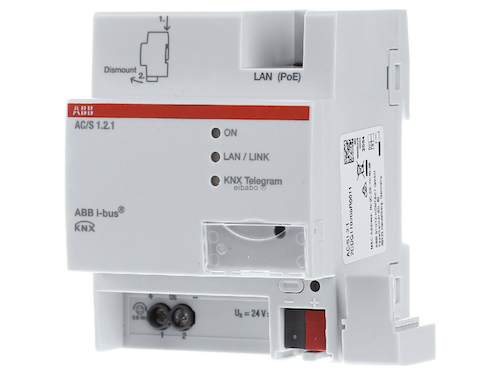
The ABB AC/S Application Controller is one such product. Rather than being another field controller, it is designed to act as a central automation layer for HVAC systems, where temperature and operating strategy are managed centrally rather than room-by-room.
Configured in ETS using a Device Configuration App (DCA), the AC/S combines automation logic, scheduling, trend logging and visualisation in a single device. Once configured, it automatically generates a web-based interface, allowing users to view and adjust system behaviour without the need for a separate front-end.
For BMS managers, the AC/S provides a practical introduction to KNX, demonstrating how KNX-based HVAC control can integrate with - rather than replace - existing BMS systems.
Typical use cases include:
- Commercial buildings
- Hotels
- Education facilities
- Hospitals and nursing homes
- Office developments
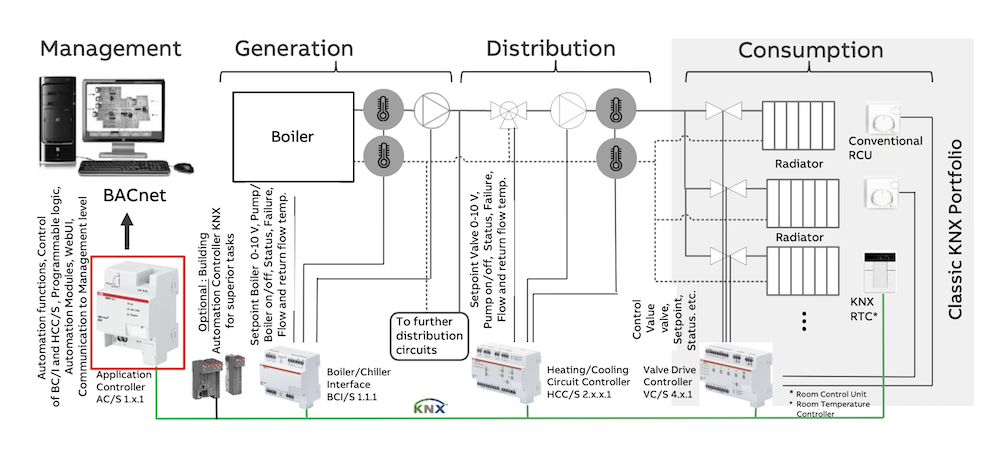
From a sustainability perspective, the AC/S supports more efficient operation by coordinating generation, distribution and room-level demand, reducing the inefficiencies that arise when these layers operate independently.
Product Variants and BMS Integration
There are two versions of the ABB AC/S Application Controller:
- - KNX-based application controller with Web UI
- - As above, with an integrated BACnet gateway
Both versions offer the same core functionality. The AC/S 1.2.1 is particularly relevant in BMS-led projects, as it allows KNX and BACnet points to be displayed and controlled together.
This is especially useful where:
- An existing BMS is already in place
- BACnet is used at management level
- KNX is being introduced for HVAC control or expansion
The BACnet interface allows BMS systems to read and write values without additional gateways or complex mapping, simplifying integration and commissioning.
Web Interface and System Overview
Once commissioned, the AC/S generates a Web interface that is accessible via a standard browser using the device IP address.
The interface provides:
- A clear overview of HVAC systems present in the building
- Access to temperatures, setpoints and operating states
- The ability to adjust or override selected values
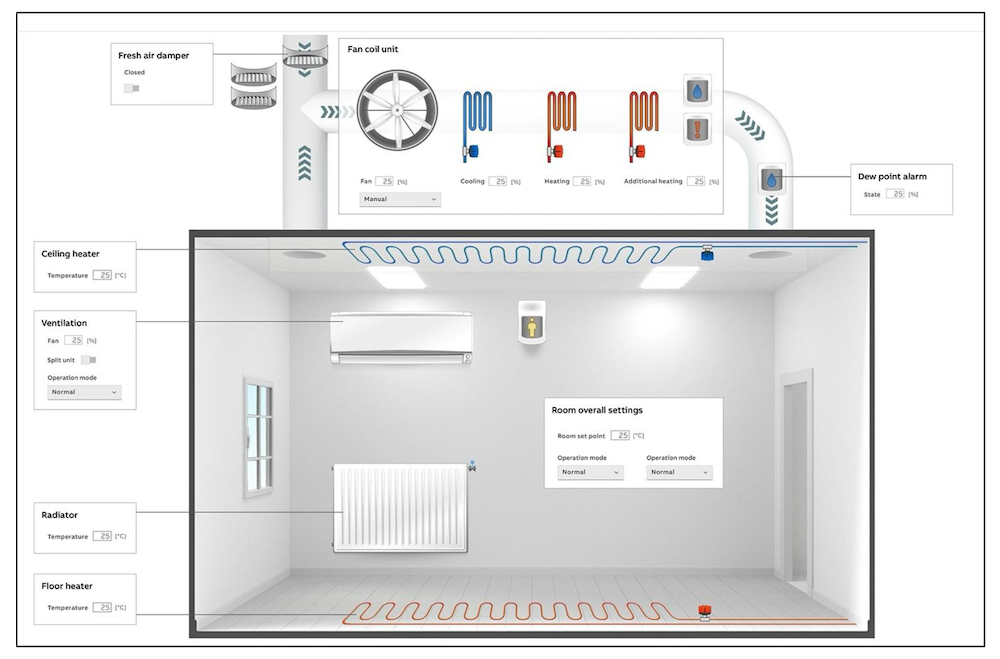
This interface is intentionally simple and functional, making it suitable for:
- Commissioning and fine-tuning
- Maintenance and fault finding
- Day-to-day operational checks
In larger projects, the Web interface can sit alongside a BMS as a local service and backup interface.
Application Specific Modules (ASM)
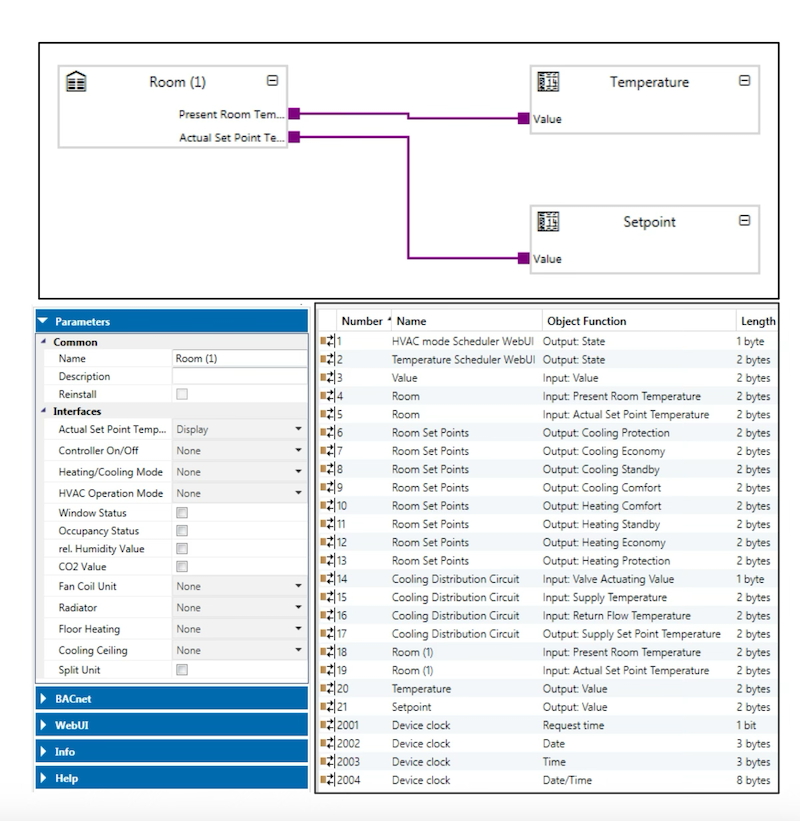
The AC/S uses Application Specific Modules (ASMs) to build both system logic and the Web interface. Each ASM represents a specific HVAC function or element within the building.
Up to 500 ASMs can be used within a single controller, allowing complex systems to be structured in a clear and logical way.
Once modules are placed into the project, the parameters tab is used to define which elements are required. These parameters directly influence what is displayed and accessible within the Web interface.
Available ASM Types
Commonly used modules include:
- Room
- Room setpoint temperatures
- Heating distribution circuit
- Heat generator
- Cooling distribution circuit
- Chiller
- Heating / cooling changeover
- Operating mode scheduler
- On / off scheduler
- Temperature scheduler
- Automation
- Value
- Link
- Trend
This modular approach makes it easier to scale systems and adapt them over time as building requirements change.
Room ASM
The Room ASM is one of the most flexible and powerful modules within the AC/S.
Room functionality is defined entirely through parameters. Once selected, these features are automatically reflected in the Web interface.
When linked to KNX group addresses or BACnet points, the Room ASM can:
- Display room temperature and setpoints
- Show operating mode and status
- Allow selected values to be adjusted or overridden
This enables two common strategies:
- Monitoring-focused rooms, where a local thermostat exists
- Centrally managed rooms, where user interaction is intentionally limited
The latter approach is particularly suited to environments such as hospitals, care homes and education buildings.
In addition to HVAC data, Room ASMs can also display:
- Window status
- Presence detection
- Other relevant room signals
Centralised room control helps prevent unnecessary energy use caused by local overrides.
Generation and Distribution Circuits
The AC/S includes dedicated modules for both generation and distribution in heating and chilled water systems.
Using these modules, the controller can:
- Aggregate demand from multiple rooms or zones
- Calculate required generator or flow temperature setpoints
- Communicate these values to controllers or interfaces via KNX or BACnet
The Web interface displays:
- Flow and return temperatures
- Circuit status
- Setpoints and override options
Where required, temperature curves can be adjusted to better match building behaviour or seasonal conditions.
Sustainability insight: Demand-led setpoints allow plant to operate at lower temperatures during partial load conditions, improving overall efficiency.
Schedulers
The AC/S provides several scheduler modules, allowing operating times and setpoints to be managed centrally.
Available schedulers include:
- Operating mode scheduler
- On / off scheduler
- Temperature scheduler
Key features:
- Seven-day scheduling
- Date-based exclusions for holidays and shutdown periods
- Central management of time-based strategies
This reduces reliance on multiple independent timers and helps ensure consistent operation across the building.
Trend Logging
The Trend ASM is used to record and visualise system data over time.
Each Trend ASM can:
- Record up to five independent values
- Log data from KNX, BACnet or internal modules
- Store data in the device’s internal memory
Once storage is full, older data is automatically overwritten.
Typical applications include:
- Performance verification
- Fault diagnosis
- Reviewing temperature and demand trends
Local trend data provides valuable insight even if BMS trend logs are unavailable.
Summary
The ABB AC/S Application Controller is part of ABB’s ClimaECO portfolio of KNX-based HVAC products, bringing together central plant control, distribution management and room-level automation.
For BMS managers, it provides:
- A clear route to introducing KNX into existing systems
- Simple integration with BACnet-based BMS platforms
- Centralised, demand-led HVAC control
- Improved operational efficiency and sustainability outcomes